Live Blogging – Laptop Institute Keynote – Scott Klososky

Live Blogging

Monday Morning keynote…

Laptop Institute Keynote – Scott KlososkyLive blogged…please excuse typos…

+++++++++

Technology…is just a tool… it doesn’t do anything…

Need to understand concepts of technology – we don’t understand how much tech has already changed things… we can spend lots of $$$ on tech, but it won’t change anything

In healthcare, Google is the second opinion.  People research diagnosis on own, self medicate, reference.  Google has rolled out Google Health Record.  Number two advertiser in world is Google – 5 years ago it didn’t exist.  targeted marketing – track and focus advertising.  Apple is number one music retailer today, only three years in development! How did this happen?

Is it possible that this can be done w. education? Can learning leadership come from outside school system?  The need will get filled.  Young people want learning, if we don’t give it to them in the way they want it, they will gte it from the net.  How do we service them? How do we create value?

The iThryv” Generation…they will use tools to survive/thrive….as educators, we need to a) Learn to better see the future, b) understand the impact of technology and c) evolve “how” you teach with new tools.

Future of technology…virtual worlds…NA has Second Life, Chinese have own…Internet in general will be come a 3D world.  Google is rumoured to be building a parrallel universe merging Google Earth and Second Life…

What is good about this?  A virtual space could be a great learning space…visual clues can be added…tags, etc… brain/computer interfaces (exist now!…read here) will allow users to navigate virtual worlds at speed of thought…

“If you are going to create value, you must INFUSE PROGRESS that will be RELEVANT in the future.”  – if we don’t, we are wasting our time…we need to think for lifelong scope…we need to think ahead…vision…

“Young people are busy assembling their “e-community”…it is not NetFun, NetVisit or NetPlay…it is NETWORK!  plaxo+linkedin+facebook=ecommunity”

  • this sounds an awful lot like my personal learning network

As educators, we need to start connecting with students in these ways if we aren’t already!

Technology has allowed us to work anytime, anywhere – need to differentiate between on the grid and off the grid…laptops won’t solve every problem…need to be able to have human interaction… it’s important to disconnect at times…

The future? We will all have a grid profile that will tell us how to contact us…what am I using in terms of tools, where am I (GPS tracking), status (busy, invisible, available), group variability of status, how am i represented? (avatars, profiles), best communication methods.

Need to learn to use right tools at right time…don’t ask simple questions via phone call…twitter, etc…that will be important for our kids to know…as teachers we need to add plaxo, linkedin, twitter and msn id’s…but soon we will simply have  a grid profile…

Cloud Computing…in 1950’s…mainframes with tethered terminals, IT controled, 1980’s…PC’s… untethered… partial IT control…standards!!, now in 2008…cloud computing… applications untethered, IT less control, all apps web-based, devices only need to have screen and input devices…cloud knows it is me, computinmg power tied to me and I can access from anywhere… for young people, this is future…they will exisit on net w. access and use tools…much for free.

Clash of cultures…collaboration vs control…business isn’t there yet…standards-based…e.g. google docs vs MS Office.

  • education is in same boat

In order to effectively teach, we have to try and see world as kids see it…EMPATHY!

Example…teaching kids financial literacy….http://mymoola.com kewl…school based.

We are blessed to live in this time of change…don’t waste it!

www.technologystory.com

tags: technology, education, whipple, learning, laptopinstitute, scott klososky
Special thank-you’s mean so much…

I dropped by my boss’ office last week for a chat.  It was the end of the year and, while we keep in touch pretty much daily on twitter, it’s always good to have that f2f interaction.  We always seem to share ideas and frustrations, sharing our visions of learning.

As I sat down, I noticed a few laptops sitting in a carrying crate.  Our district has put together a few “loaner kits” of laptop pods for K-5 schools.  We also have loaners of GPS units for geocaching and podcast equipment.  While not the ideal of having ubiquotous access for all learners, it is a great start.  The units are in constant demand – a good problem to have – and the district continues to work to have more mobile kits available.

My boss was telling me about a recent visit he made to a Kindergarten class.  This young boy was eager to talk.  “Hey mister!  I wanna show you something…come over here!”.  My boss, of course, wanted to see what the youngster had created.  But it wasn’t a product that he wanted to show.  It was a secret.  The secret of the red line.

“See what happens when I don’t spell a word right”, he said.  “This little red line appears underneath it.  And look, if I right click, I get this word list and I have to choose the correct spelling for the word I want”.  My boss, of course, played along, pretending to have seen spellchecker for the very first time.

I know that many – including teachers I talk to – don’t like spellcheck.  They think it excuses kids from learning to spell.  I would argue that it does just the opposite.  If the red line didn’t appear under the word, he would never have known it was misspelled, and would never have had the opportunity to correct his spelling.

This child was becoming a 21st century learner.  Utilizing the available tools, he was able to identify and solve a problem.  This type of assistive technology will be increasingly available in their work, play and learning spaces.
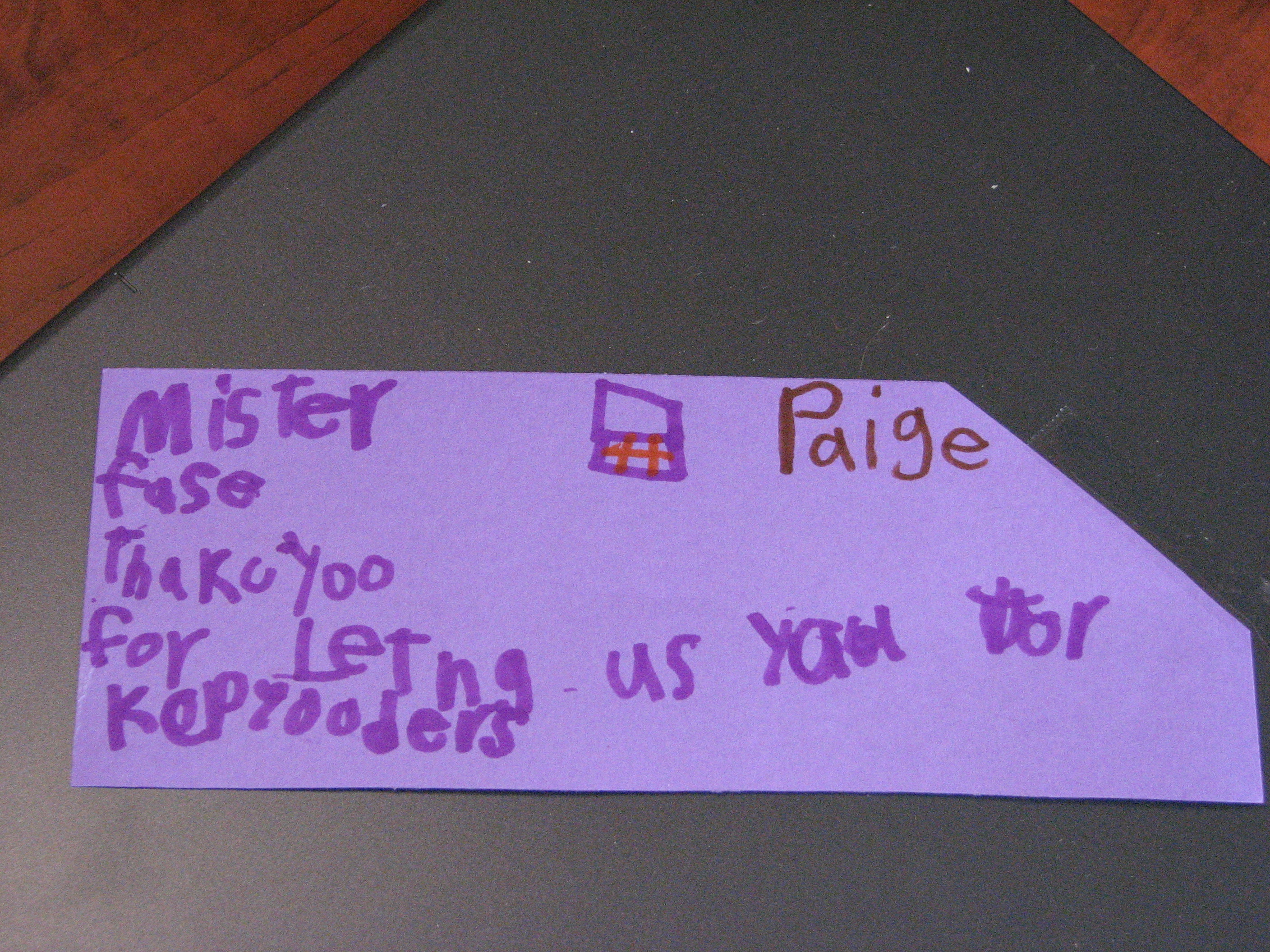
Of course, no loan would be complete without the thank-you note.  Coming from a kindergarten class, you would expect nothing less than perfection, misspellings and all!

Paige writes…“Mister Facey, Thank you for lending us your computers.”

What more could you ask for. Perfect.

tags: technology, education, whipple, learning

Redefining SMART…

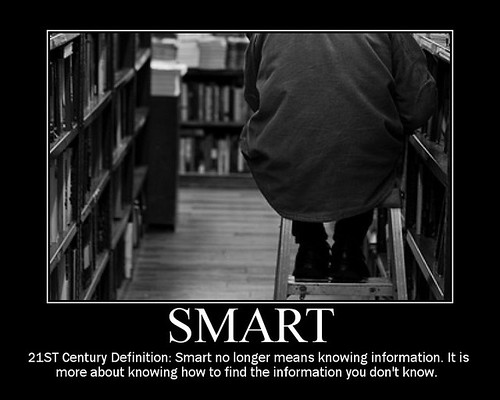
Caught this poster over on Cathy Nelson’s TechnoTuesday blog… it’s so simple it’s powerful.

This poster speaks volumes about the changing nature of our world. What does it mean for our schools? Just what to we need to be teaching our kids when all “knowledge” is a couple of mouse-clicks away?

I sent this out to our teachers today with a challenge. As we spend our last few days at schools this term, and move into summer renewal, take some time to reflect just what this should mean to us as teachers.

How should the increasingly connected nature of our global community – and our kids as individuals – be reflected in our schools? What should the shift in learning look like in their classroom?

I hope at least some of them take some time this summer to think about the massive shift needed in our schools to help our kids prepare for a connected and collaborative future in which they will work, play and learn – and what they can do to start shifting their individual classrooms.

tags: technology, education, whipple

Social Media in Education

Many teachers and other adults from my generation have a hard time seeing any connection between the new media landscape and education. The reality is, however, all learning has evolved from conversations and connections over history, and the best learning is participatory in nature. While many cultures have no formal schooling, learning is integral to supporting the continued growth and health of their culture and communities.

Much of the challenge to shift adult thinking about social media in learning environments comes from misunderstanding. Perhaps this video will help. Can we draw correlations between the shift in new media and how we do business to the new tools and how we do learning?

Creating for an (authentic) audience

After spending two years as a lead teacher in a 1:1 student laptop project, the past two years my primary objective as a Technology Mentor has been to support teachers and students to utilize this wonderful resource within the learning process.

I also work with another school, less technology-rich. In fact, it’s probably more reflective of most public schools across North America. While we all recognize that technology must play an important role as we struggle to shift our schools to learning environments designed for the 21st century, the financial investment always seems to be an issue for most jurisdictions.

What we were able to do this year was recycle one 30 laptop cart full of computers retired from the original 1:1 project. To say that this technology, regardless of the fact it was previously used, was appreciated by teachers and students, would be an understatement. Over the course of the year I was able to work with learners in all kinds of different projects as we rotated the cart through different teams and teachers. Some stuck with digitizing previous practice, while others moved a bit further. All engaged students and moved previous practice forward.

The last day I have spent with Ms. Mitchell’s Grade 8 classes as they are wrapping up their year with a fun project. She came to me a while back and, knowing she would be the last class to access the COW (Computers on Wheels) this year, she wanted to do something fun. This is her idea. The student’s job – to create and digitize children’s stories to share with the elementary students across the street. We will also celebrate their work on the school website.

Unlike my 1:1 school, many of the students at this school come from a different socio-economic profile. Many don’t have computers at home, and for some this access is their first exposure to creating something for sharing on-line. Even though they are just starting production, the knowledge that their creations will be shared with an authentic audience, both in person and online, is hugely motivating. After spending over a week illustrating (by hand) their stories, they are now photographing their pictures and putting them together, adding text, transitions and narrations. Amazing times in this classroom.

Perhaps the neatest thing is that students who before may have struggled, can find a place as a leader in the learning in some way. Even students who are less than stellar artists are finding leadership roles showing others how to utilize the technology. It really is a collaborative effort.

tags: technology, education, whipple

Natural Connections

Received this link via email today. This site features a live video feed that invades (nicely) a Bald Eagle’s nest, available for watching 24 hours a day (although nighttime is kind of dark!).

What a way to connect classrooms with the natural world. Students could spend a few minutes watching the feed, maybe capturing stills and video, use it to generate further questions (what is mommy Eagle feeding the chicks?), and then proceed to find the answers, creating more questions along the way.

While this feed is provided and supported by a private company, National Geographic provides live feeds for both a watering hole in southern Africa and Polar Bears in northern Canada.

While it will never be possible for each student to visit all these places, increased connectivity will allow each of them to access the sights and sounds of real natural spaces.

Enjoy!

tags: technology, education, whipple, national geographic

Investing in Leadership

Just over 10 months ago I was sitting at O’Hare Airport in Chicago, on a four-hour layover. I emailed my supervisor, telling him that next year (this coming summer) I didn’t want to make the trip between my hometown of Fredericton on the east coast of Canada and Memphis alone again.

It wasn’t that I minded traveling alone. Rather, I wanted my colleagues to enjoy the same exposure to the vision, enthusiasm and knowledge that comes with enjoying conversations with fellow teachers and educational leaders. You see, I was on the way home from another amazing learning experience, my second Laptop Institute conference, hosted by Lausanne Collegiate School in Memphis, where over 600 people gathered to talk about 1:1 programs.

That I came to attend LI at all was a bit of a chance. As a lead teacher in a new 1:1 program four years ago, we were offered support to pursue personal PD. After originally missing an opportunity to attend FETC in Orlando, I chose to attend LI, a conference I had found on the Internet.

Two years ago my teaching partner and I attended for the first time. As a relatively new teacher piloting a new program, I was happily naïve in the fact that students seemed to be more engaged while using the technology, not realizing that we were just teaching the same old way using new methods of delivery.

That first LI was an epiphany. I met other teachers who were doing wonderful things, but the real shift in thinking came after hearing David Warlick speak. It didn’t hit me at first, but gradually, over the course of a few days and weeks – planes, airports and summer give lots of time for reflection – I began to realize that the key wasn’t the technology, but the opportunities it offers for shifting from teaching to learning.

That experience afforded me the opportunity to connect. I began to read blogs, connect with others by commenting, and then stepped out to start blogging myself. From there…well…the world awaited!

I am so happy that my district’s Technology Supervisor and my Principal agreed with me on the value of conferences for motivating and growing collective vision amongst teachers. I was able to work with both of them and our local and provincial teacher’s association PD funds to find the funds to send EIGHT teachers to Memphis – no small feat considering that will run us close to $15,000!! Our district IS Manager is supporting our school IS technician as well. In short, the count will be ten staff from our school, including our Principal himself. Needless to say, there is a lot of excitement among the staff who are attending.

That first Laptop Institute conference interrupted my personal narrative of education, shifting it onto a whole new track – from teaching to learning. Since then I have had the opportunity to return to LI, attend NECC07 in Atlanta and a couple of regional conferences. I have come away with a whole new appreciation of the value and power of conversations in learning.

I hope that this exposure will give our teachers the same excitement and enthusiasm for becoming learning leaders that attending that first LI has had on me. I believe we will see a huge return on this investment in leadership.

tags: technology, education, whipple, laptopinstitute
, warlick

Student Blogging…

I have been pondering just how to expand our student blogging next year for a while. There’s the pedagogical side of it, which is a conversation I need to have with teachers, but then there is the platform side of it, a conversation I am starting to address with our IS staff.

As a 1:1 school, it’s important that we leverage our technology to the maximum. I am continually encouraging teachers towards student content production for an authentic, global audience. Part of that is blogs. They can be used for many pedagogical applications / learning conversations across the curriculum.

I have approached IS about hosting WordPress blogs on our own server in lieu of our current use of a mix of Edublogs, Blogger and Classblogmeister. I would like to host this on our own server space, but support is always an issue. The Department of Education does have a teacher portal and a student portal is scheduled to be piloted next year, but I am not convinced that the MS Sharepoint platform will do much for us. It is a business tool, and while it has blogs and wikis built in, I remain to be convinced that they encourage the innovation and creativity we want to encourage in our classrooms.

I was asked by IS what would I want in a student blog platform…I had to think a bit, but I think this list captures the basic features in a school-wide student blogging platform.

1. Public access and comment features (flexibility in settings from open to moderated comments)

2. Ability to embed visual traffic monitoring (e.g. ClustrMaps)…dots on a map are a tremendous motivator for students

3. Ability to embed badges and other widgits on blog sidebars to manage look, feel and usability

4. RSS feeds available for both posts and comments

5. Ability to upload images and small video files into blog

6. Ability to easily embed media (e.g. YouTube, TeacherTube, Slideshare, Flickr, etc.) via html embed codes into blog posts and sidebar widgits

7. Student ability to choose from a variety of look and feel themes…just like they all dress differently, they all want different expressions on their public face…

Anything to add?

tags: technology, education, whipple, wordpress

Connected to India!

It was VERY early on Wednesday morning, but students in Mr. Carrier’s homeroom at Nashwaaksis Middle School enjoyed a connection they won’t soon forget as they moved on to the next phase of their ongoing French language project with students at the American School of Bombay in Mumbai, India.

With the school day yet to start in Canada, and students staying into the late afternoon in India, the two classes connected virtually through the power of video-conferencing. Students were able to connect and share their work and then had a chance to spend a bit of time having fun together.

A couple of notes about this project. One of the real barriers to developing global collaborative projects is trust – mostly that the teachers and learners on the other end simply won’t disappear. While services like ePals, Global Teenager et al provide a valuable opportunity to connect, the best projects are built on personal relationships between the teachers involved. I have done many sessions on global project, and I always suggest that teachers look back at the people they studied with in university. Where are they teaching now? Can they be a partner?

I am fortunate that I get to attend one or two major conferencs a year. I go with two goals in mind; learning through conversations and to develop professional/personal relationships which might also be leveraged as contacts for student projects.

This project came out of relationships I have made over the last couple of years with a few ASB staff, namely Shabbi Luthra (IT Director), Dianna Pratt (Tech LS) and Oanh Vovan (French Teacher). This project could not have happened without their friendship and professional trust.

Secondly, this project was multi-faceted. In a province that is officially bilingual (English/French) it is important that our young people be given the opportunity to learn French – not always an easy task for anglophone students in a sea of English media. They also need to learn about the world in this new global environment. This project allowed us to do both.

This project was simple, students were to use a wikispace to share stories about their life as young people in India and Canada. They told narratives of food, music, etc…all the staples of life as a teenager. They soon found out that they have differences, but also many similarities. It is indeed a flat world!

This video hookup was developed to allow them to share their new understandings. Each student introduced themselves and (in French!) talked about their work on the project. Back and forth they went as they shared ideas and asked questions.

Then came the fun…for the last 15 minutes or so they were given the chance to be kids… sharing… tittering… talking… singing… they even did the Macarena together! I think there was even a bit of puppy love in the air. It was wonderful. Kids just being kids, coming together and learning to connect.

A 21st Century learning experience at it’s best! Check out the photos on the slideshow! Their smiles say it all…

BubbleShare: Share photos – Powered by BubbleShare

Next Season on Survivor…

It’s Friday! Here’s something light…yet so revealing! Received it by email from a colleague… enjoy!

***************

Have you heard about the next planned “Survivor” show?

Three businessmen and three businesswomen will be dropped in an elementary school classroom for 1 school year. Each business person will be provided with a copy of his/her school district’s curriculum, and a class of 28 – 32 students.

Each class will have a minimum of five learning-disabled children, three with A.D.D., one gifted child, and two who speak limited English. Three students will be labeled with severe behavior problems.

Each business person must complete lesson plans at least 5 days in advance, with annotations for curriculum objectives and state frameworks… And then modify, organize, or create their materials accordingly. They will be required to teach students, handle misconduct, implement technology, document attendance, write referrals, correct homework, make bulletin boards, compute grades, complete report cards, document benchmarks, communicate with parents, and arrange parent conferences. They must also stand in their doorway between class changes to monitor the hallways.

In addition, they will complete fire drills, tornado drills, and [Code Red] drills for shooting attacks each month.

They must attend workshops, faculty meetings,and attend curriculum development meetings. They must also tutor students who are behind and strive to get their 2 non-English speaking children proficient enough to take the Stanford, Terra Nova, Diagnostics and MCAS tests. If they are sick or having a bad day they must not let it show.

Each day they must incorporate reading, writing, math, science, and social studies into the program. They must maintain discipline and provide an educationally stimulating environment to motivate students at all times. If all students do not wish to cooperate, work, or learn, the teacher will be held responsible.

The business people will only have access to the public golf course on the weekends, but with their new salary, they may not be able to afford it. There will be no access to vendors who want to take them out to lunch, and lunch will be limited to thirty minutes, which is not counted as part of their work day. The business people will be permitted to use a restroom, as long as another survival candidate can supervise their class.

If the copier is operable, they may make copies of necessary materials before, or after, school. However, they cannot surpass their monthly limit of copies. The business people must continually advance their education, at their expense, and on their own time.

The winner of this Season of Survivor will be allowed to return to their job.